Sales are a company's lifeblood. We sell available products when customers inquire about a specific item. These sales take place in various ways. Some of these leads come from social media, and others from leads that our current clients have sent us. Since our partners are creating prospects for our business, we will compensate them till the new sale is finalized if they recommend one of our clients. It's a great marketing tactic that helps the business expand. The Commission Plan is a recent feature in Odoo ERP Software that enables payment to partners for referring new sales. We provide them a commission equal to a specific portion of the total amount that the partner is invoiced.
The sales sector is highly competitive. To make substantial profits and advance the company, salespeople must continuously exceed sales goals. You must also acknowledge the salesperson's success to motivate them to put their all into every battle in this field. Sales commissions are an important factor in achieving this. For example, a sales commission is a form of financial support that encourages salespeople to close more agreements. The goal is to increase business and sales by encouraging salespeople to exceed targets that they are fully comfortable achieving. The structure you established for the sales commission, which is essential for drawing and keeping the best talent in the company, encourages your sales force to sell the best items and uphold the highest moral standards.
A commission-based plan supports and motivates the sales team and individual salespeople in achieving their targets and increasing profit margins, as motivating the sales team is a key factor in successful sales. It is possible for the CRM Commission plan to operate as a separate commission plan module. It provides salespeople with the financial incentive they require to achieve their particular goals. Revenue and products are the two main categories of compensation schemes that make up the CRM commission plan.
Graded commission and straight commission are the two types of compensation. The CRM dashboard, which gives you a summary of the Odoo 19 CRM Module, is another feature of the CRM Commission plan. Leads, opportunities, anticipated revenue, total revenue, and other reports on different CRM chores are all accessible through CRM modules. In addition, the sales team and individual sales representatives will receive compensation based on the number of business prospects they contribute to the company.
Depending on the customer's success and partner level, a commission plan may be implemented and provided to them. Both current and potential clients can be adequately observed and monitored thanks to this function. One of the most important parts of the Odoo ERP software, which is suitable for all kinds of enterprises, is the Odoo 19 CRM Module.
With Odoo 19, customers can access a broad set of features and work with different partners. It also allows the exchange of leads and opportunities through any participating partner. Customers can trade leads and possibilities with you from any of your partners. You can offer them a commission if they choose to close a deal. This feature helps your marketing-related business grow. The commission plan feature in Odoo ERP allows you to share a portion of the commission with clients who participate in sales activities.
As seen in the screenshot below, there are two options available under the Settings and Configuration menu.
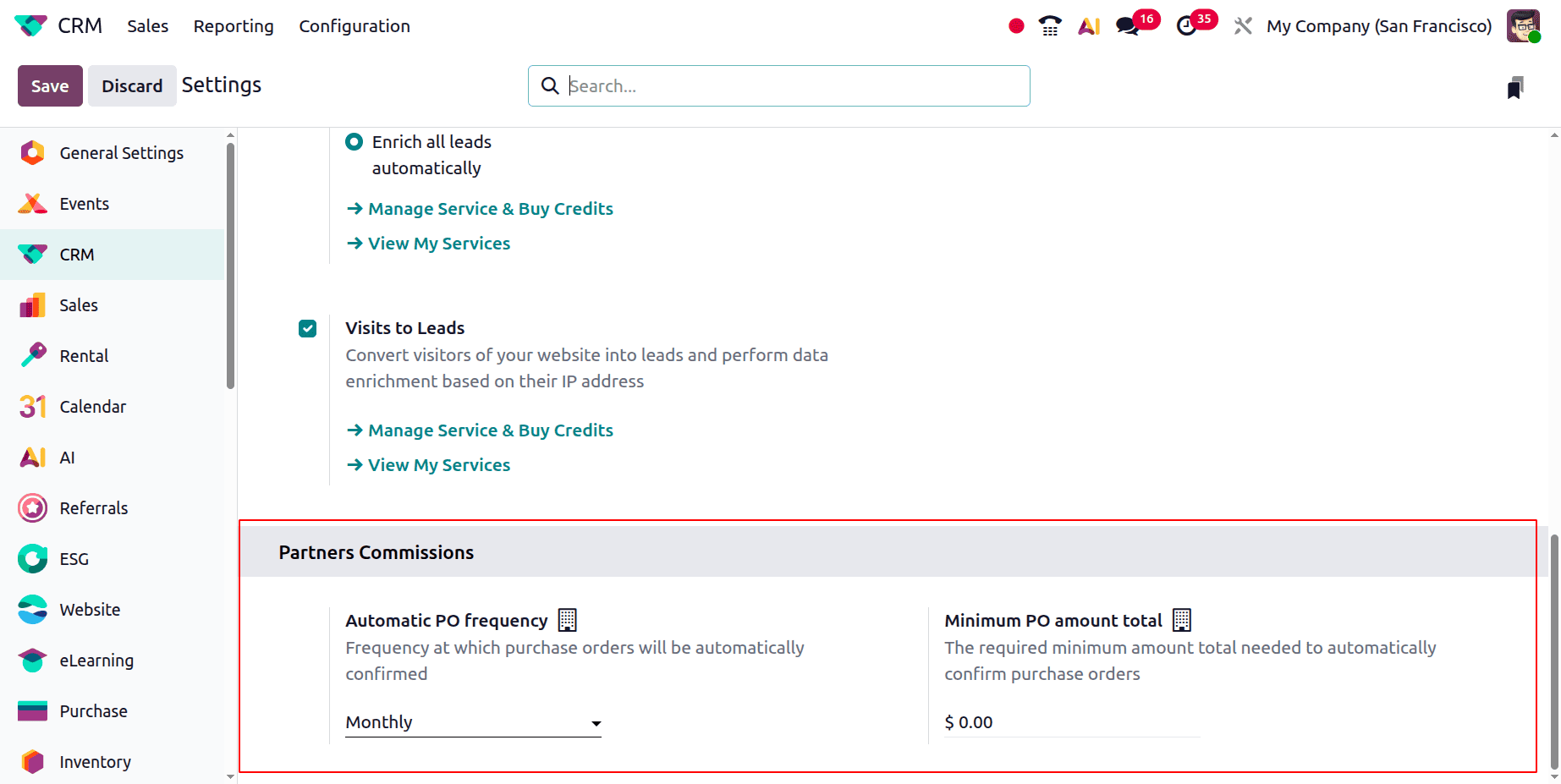
The first is "Automatic PO frequency," which refers to the frequency at which purchase orders will be automatically verified. Weekly, monthly, or quarterly settings are available. The second is the "Minimum PO amount total," or the minimum amount needed for purchase orders to be automatically validated.
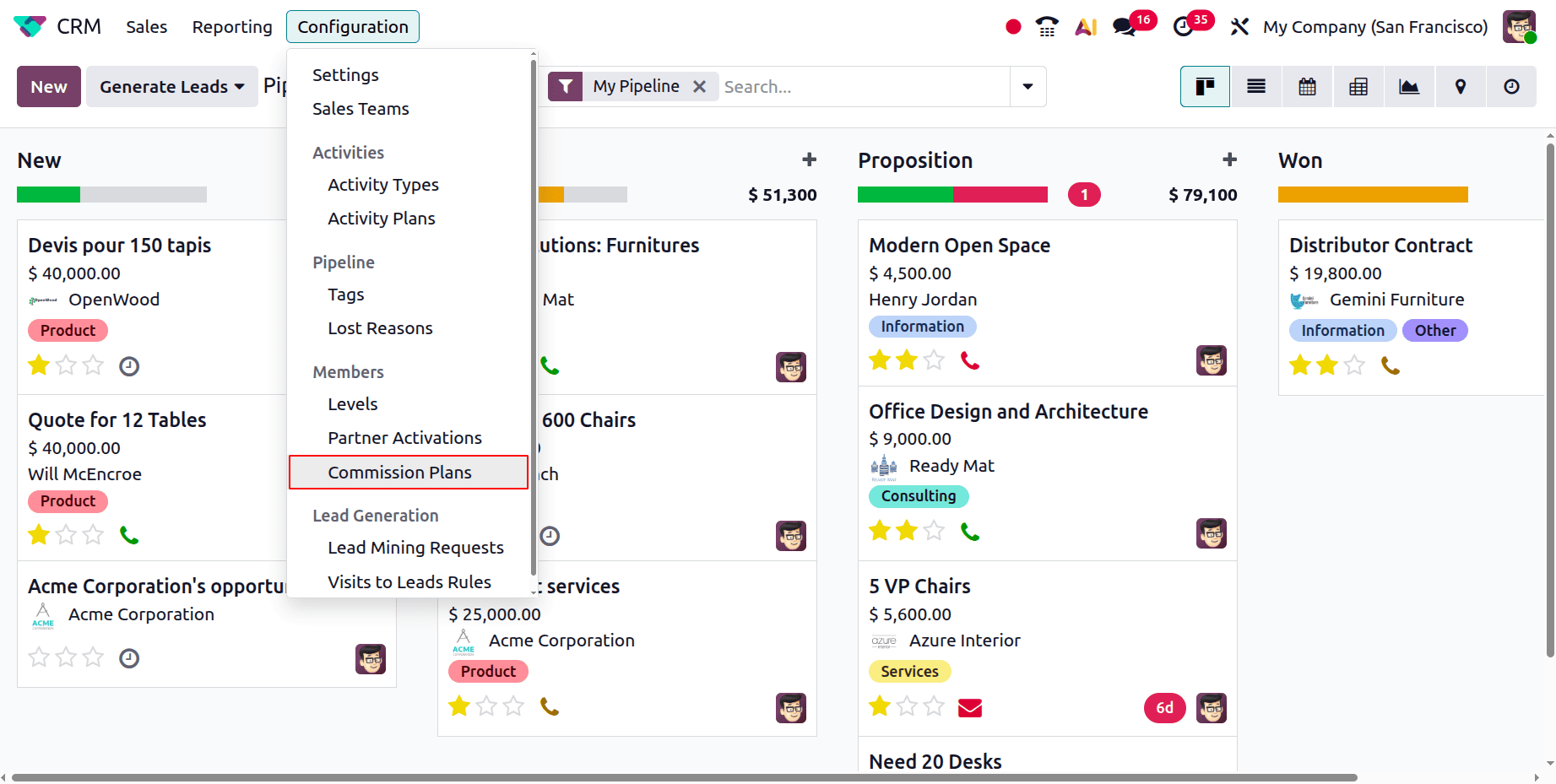
The following steps are required to configure these commission programs. First, the Commission Plans option is found in the Configuration menu, as seen below.
To create a new commission plan, click the New button. There are some details that you must enter. You now need to give the commission plan a name in the Name area. In other words, if you decide to offer commission at the rate of 5% of the invoiced amount, the commission plan will be known as “5%Commission”. This indicates that a 5% discount will be provided by Mitchell Admin. Below this, you will find the Purchase Default Product option, where the commission is set as the default product for the transaction. The firm name, as shown in the screenshot below, must now be entered in the firm section.
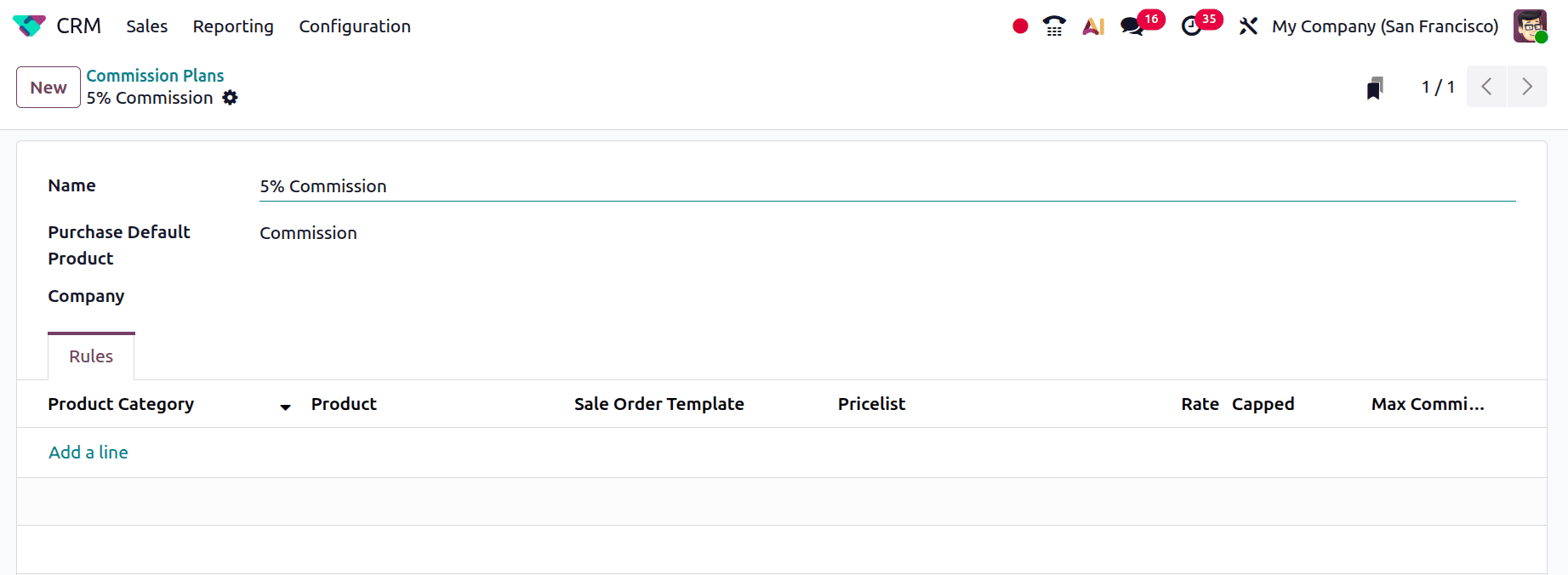
Rules are made under the Rules tab. Using the Add a Line option, you can provide Product Category, Product, Sales Order Template, Pricelist, Rate, Capped, and Maximum Commission in that order, as seen in the screenshot below. There, we can choose whether or not to give our partner commission for a specific product or product category. This rule will apply to the subscription template if the option to add one is selected. In this case, we can establish a percentage rate.
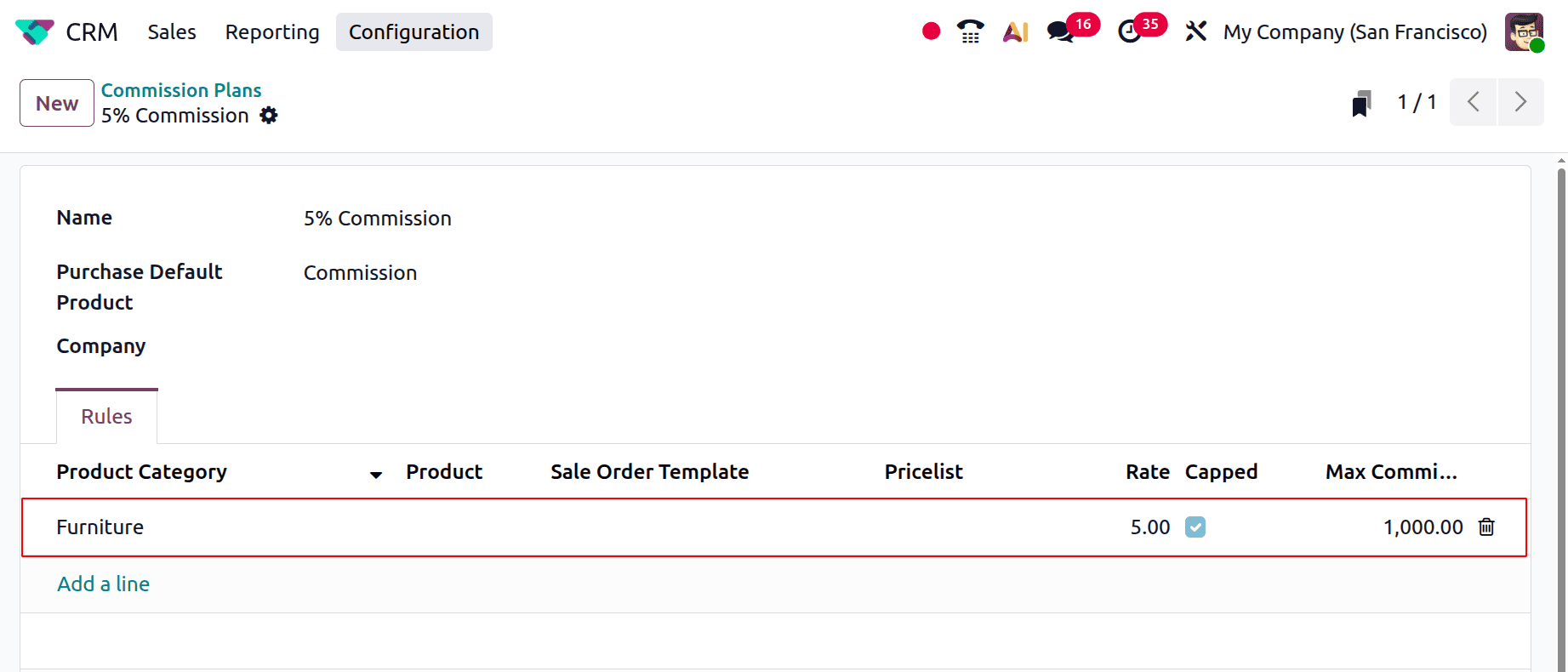
Here, the Commission plan is created for the Product Category named Furniture. The Partner gets 5% of the invoiced amount as commission, but the maximum commission amount should be $1000.
Now, let's look at how to select this particular commission structure for your partner's company. For this procedure, you can access the partner's contact details through the Customers menu or the Contacts module. From there, you can select the Commission Plan and Partner Level, as shown in the screenshot below.
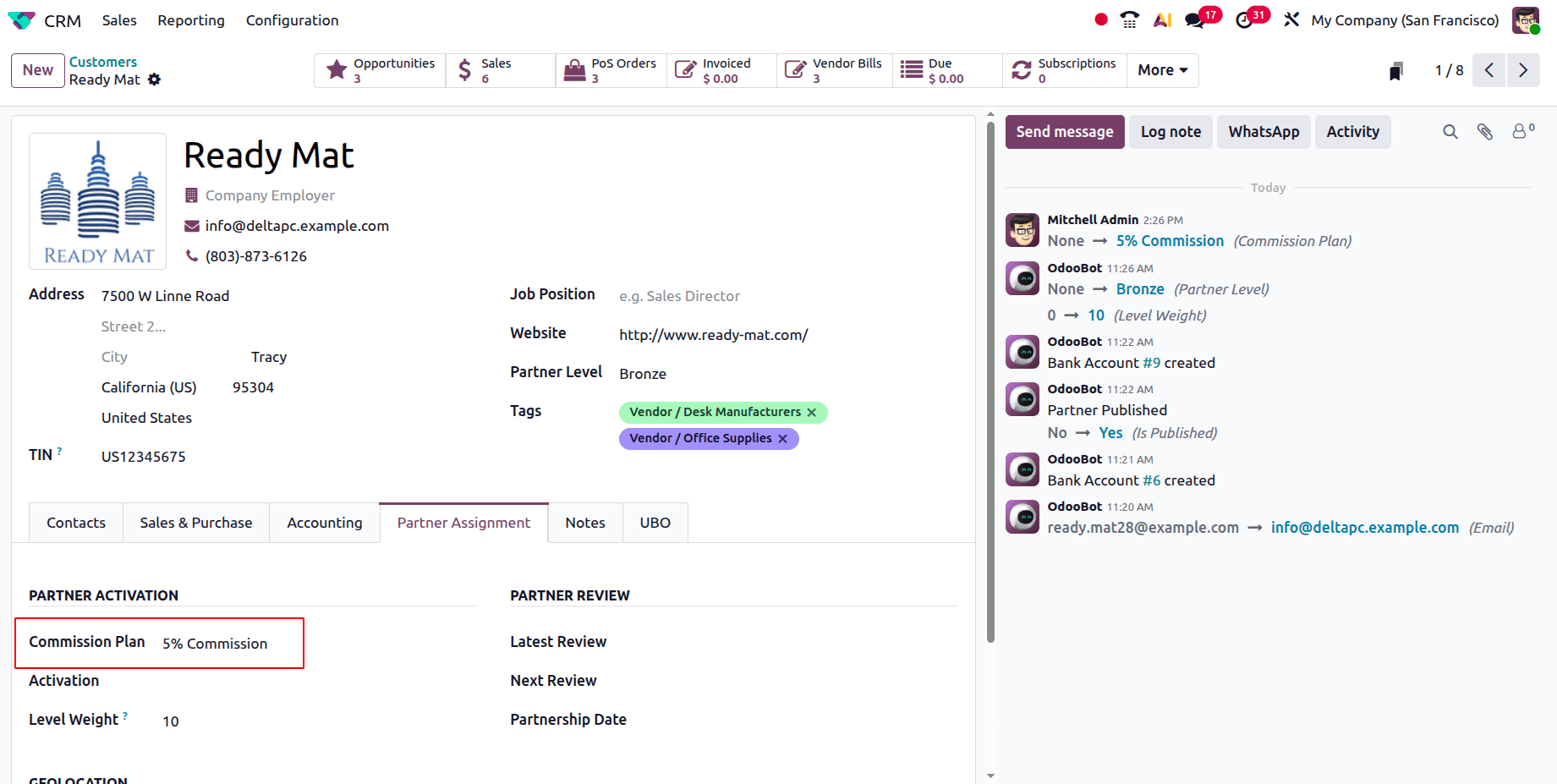
The Commission Plan is required to enable Partner Activation. This option is located under the Partner Assignment tab. When a partner introduces a customer from the offered product category, they will receive a commission of 5% of the billed amount. You now need to provide your partner's ID in the referrer field.
Create a new quotation now by going to the Sales module. There, as shown in the screenshot below, choose the client and referrer from the given list.
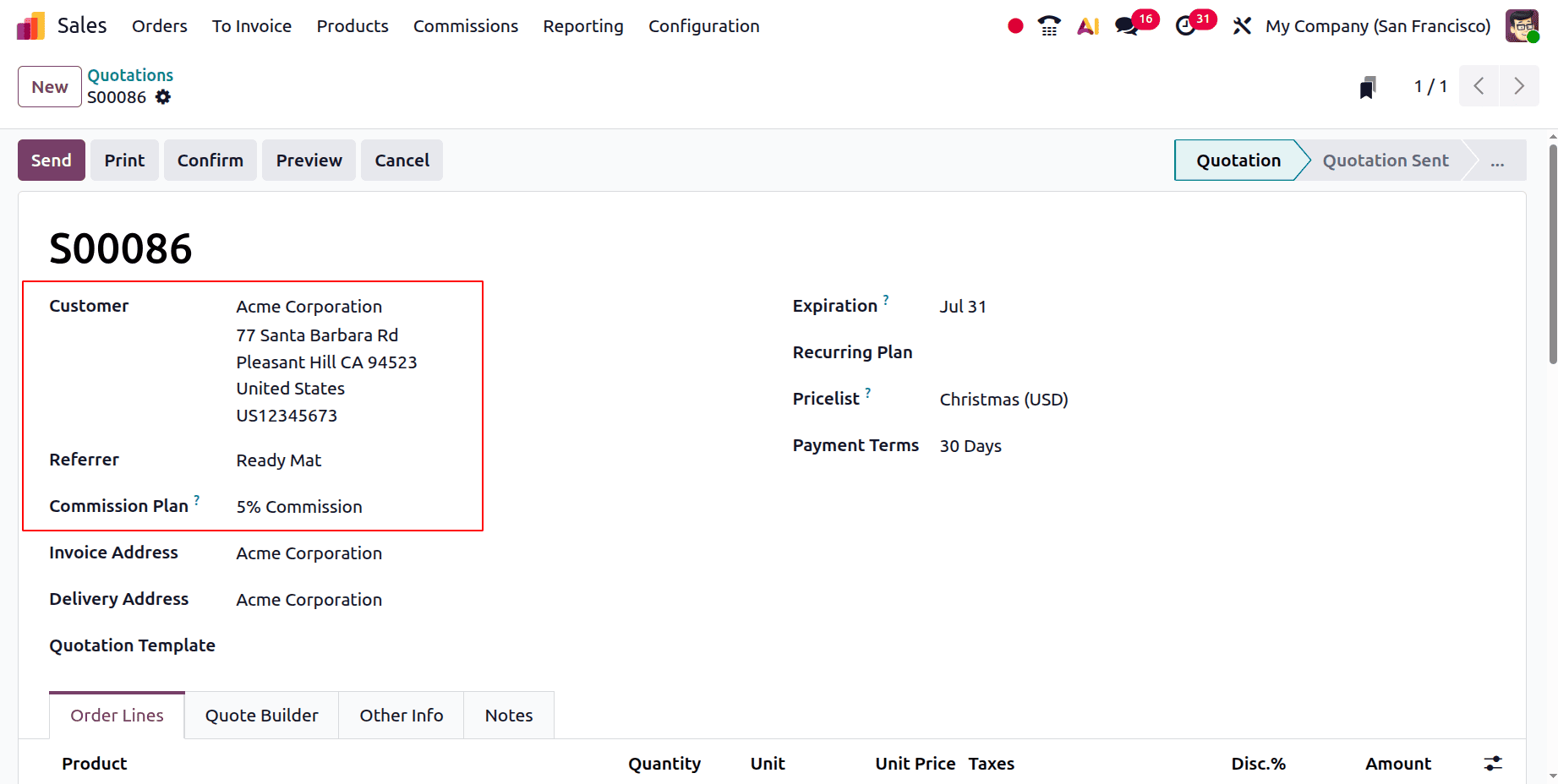
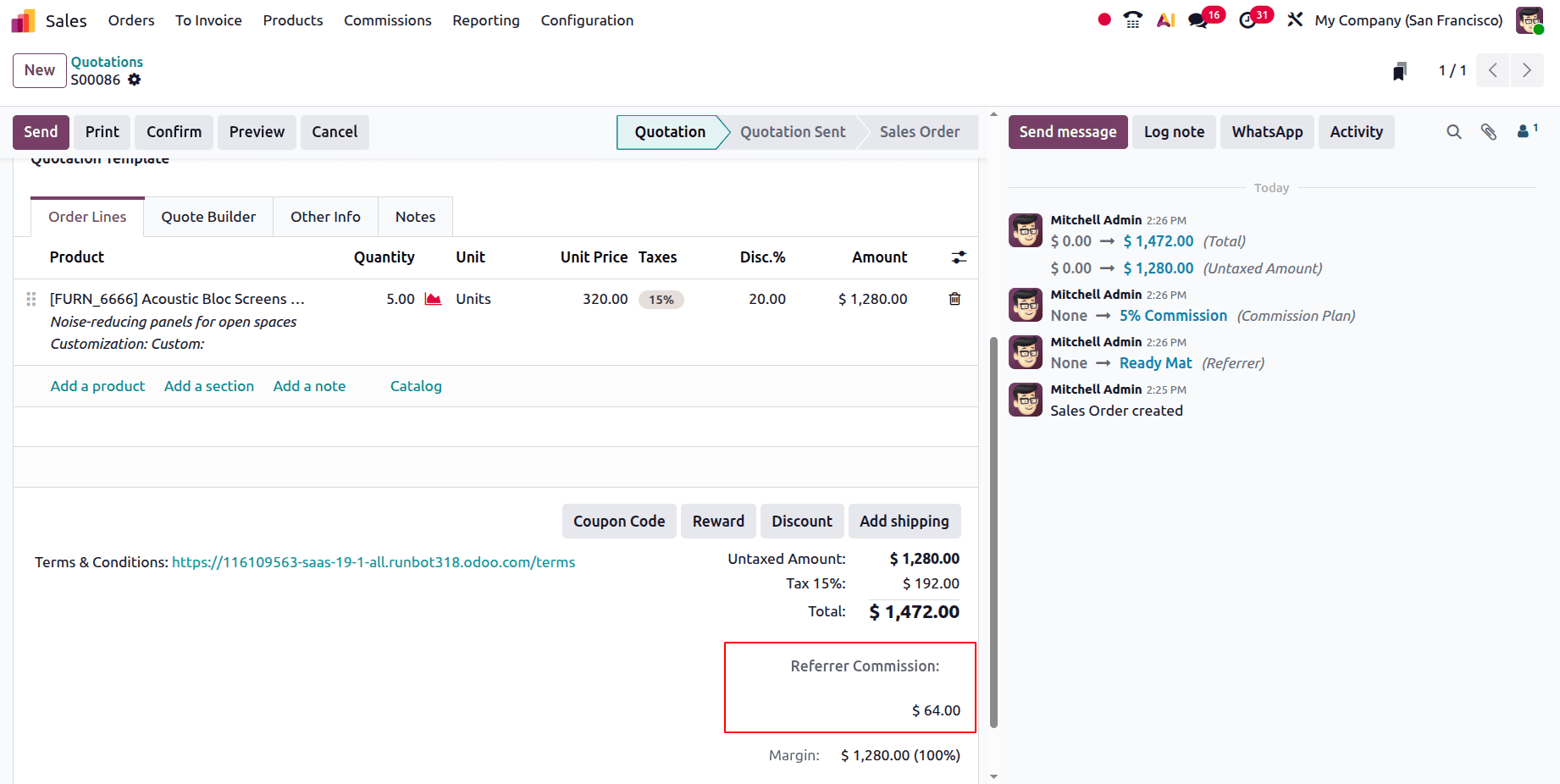
The guidelines for the product "Acoustic Bloc Screen," which falls under the Product Category Furniture, have now been developed. We can add five quantities with a $320.00 unit sales price to the Orders line. Here, the referral commission is displayed at the bottom of the sales order.
In this instance, "Acme Corporation," a client, is referred to the business by the referrer. The referrer will receive 5% of the invoice as a commission after the customer has paid the invoice.
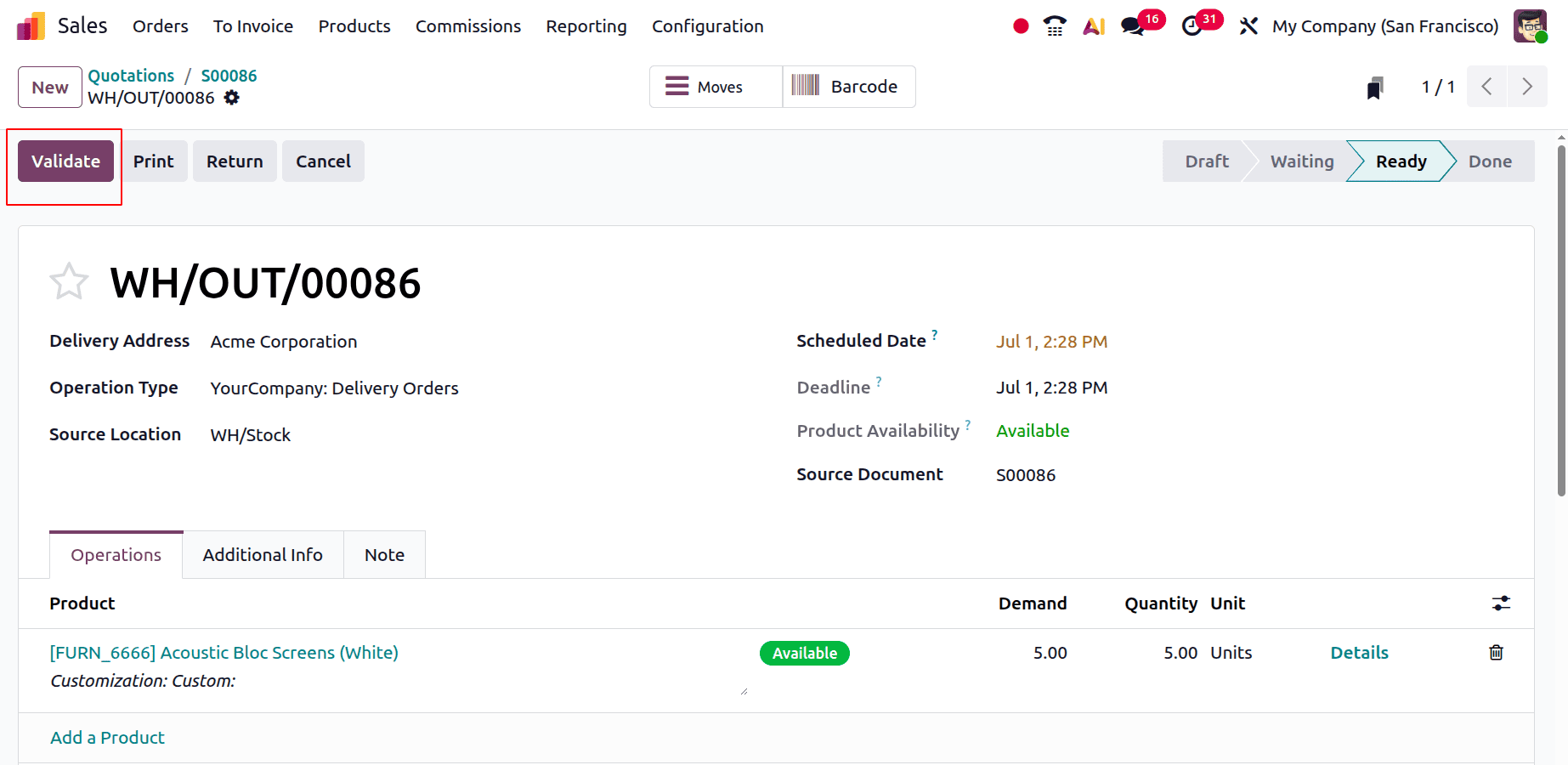
The commission plan can now be displayed there, as we have created a dedicated commission plan specifically for the partner. Let's confirm and deliver now.
After that, you can create an invoice.
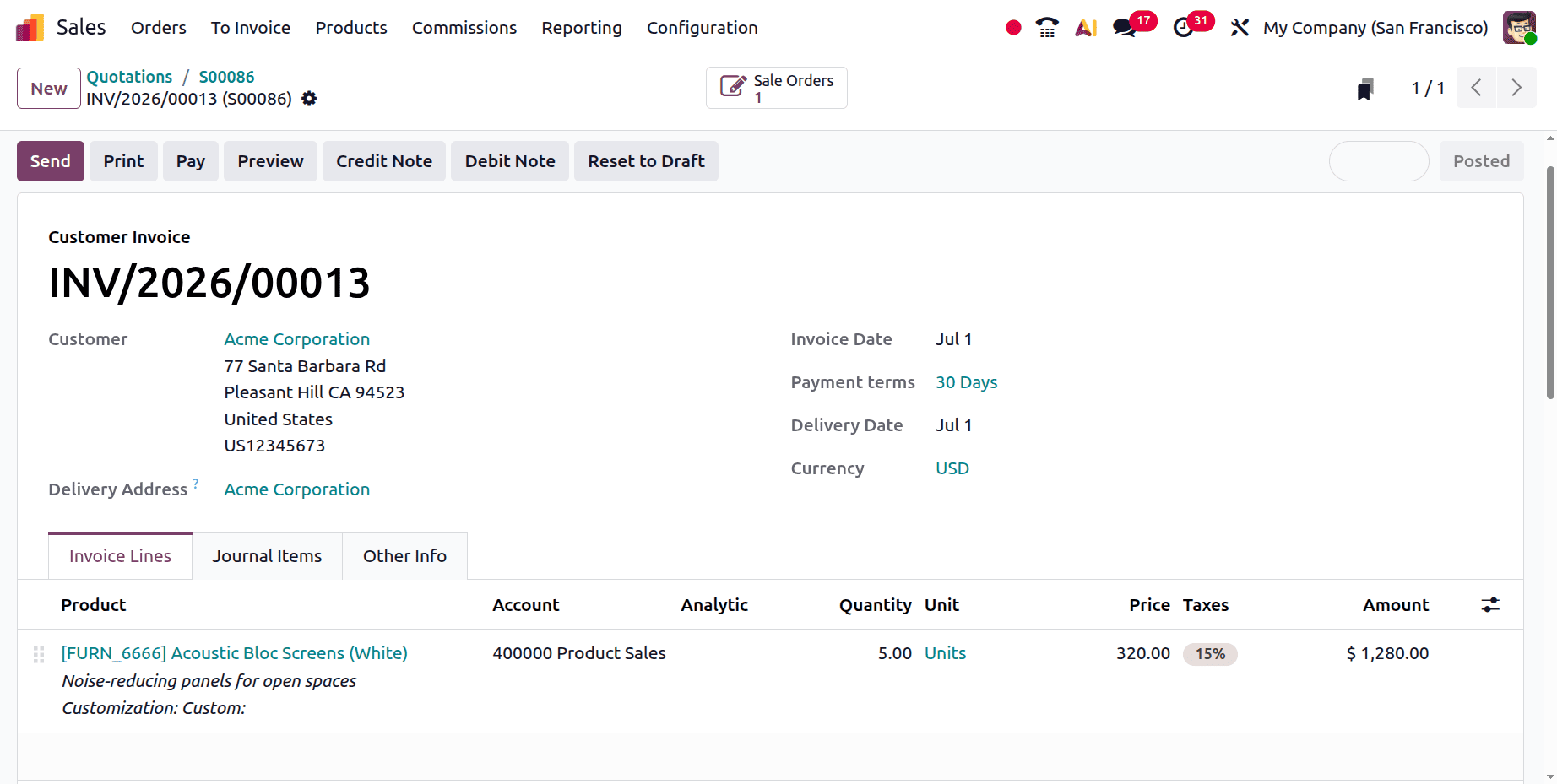
Once the payment process is complete, 5% of the invoiced amount will be transferred to the partner's account. The partner will subsequently receive a request for proposals in addition to the product commission.
As a result, you may promptly verify the order and generate the vendor bill. You can then give the partner their commission as well. Create a commission plan for your partner using the Odoo ERP software.
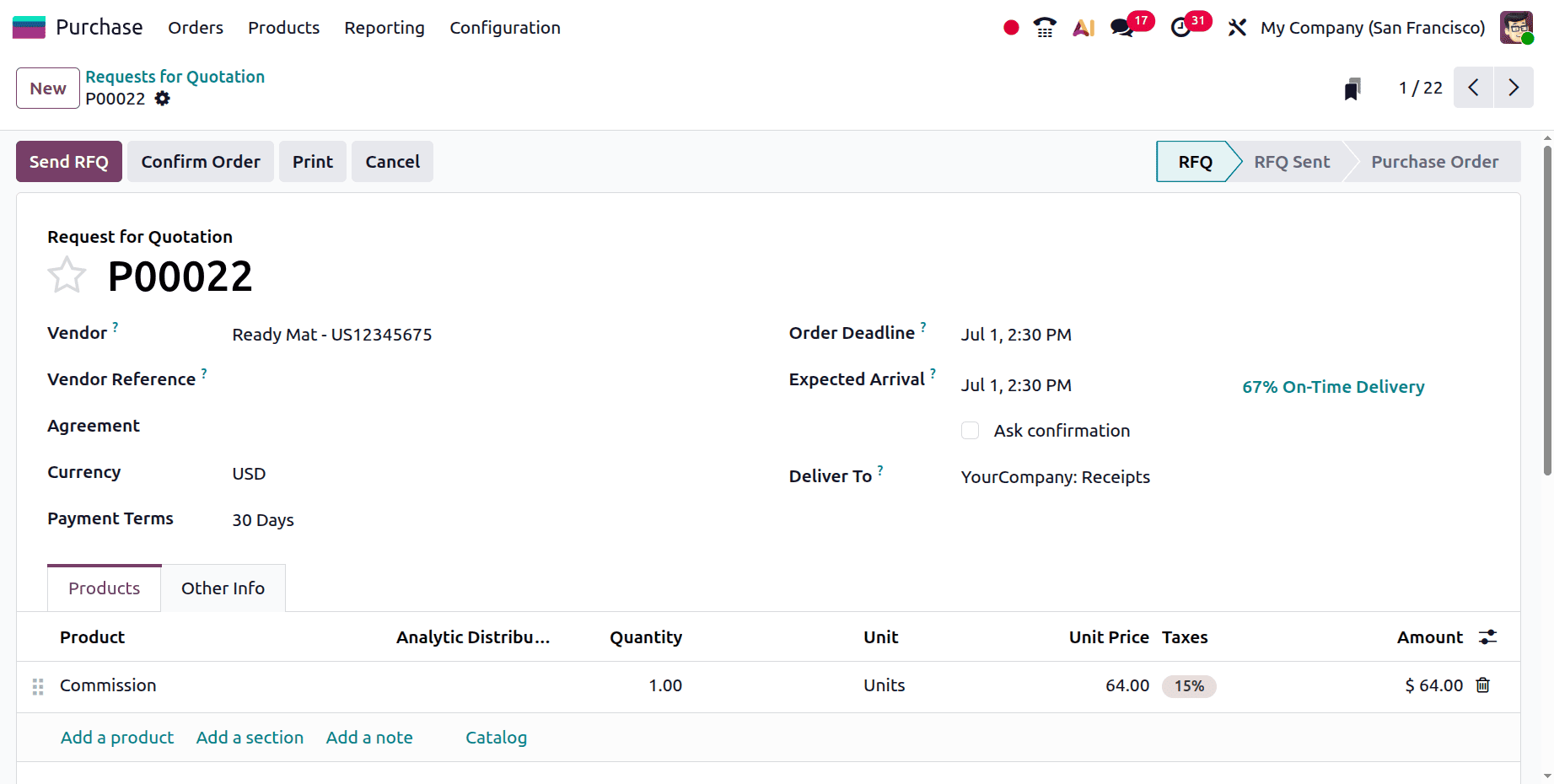
As a result, you may promptly verify the order and generate the vendor bill. You can then give the partner their commission as well. Create a commission plan for your partner using the Odoo ERP software.
Odoo 19 CRM's Commission Plan function offers a versatile and effective means of inspiring sales teams while guaranteeing precise commission computations. Businesses can simplify incentive administration and cut down on manual labour by establishing precise commission rules and tying them to sales performance. Additionally, this function increases transparency by assisting sales personnel in monitoring their earnings and promoting increased productivity. All things considered, Odoo 19 CRM's Commission Plan is a useful tool for successfully rewarding performance and matching sales targets with company expansion.
To read more about Overview of Set Up and Tracking Salesperson Commissions in Odoo 19, refer to our blog Overview of Set Up and Tracking Salesperson Commissions in Odoo 19.