In Odoo, ‘Controllers’ are used to configure the frontend modules. These frontend modules come integrated with the backend modules. For example, if one needs to bring the sales order details to the website, he can’t use the functionality of ‘Models’ in Odoo. However, via using the controllers, he can get the sales order details from the backend. Modules like ‘Website sale’, ‘Website blog’, ‘Website forum’, etc are using the controllers to extend their functionality. By using controllers, one can easily define the link between any URL and webpages.
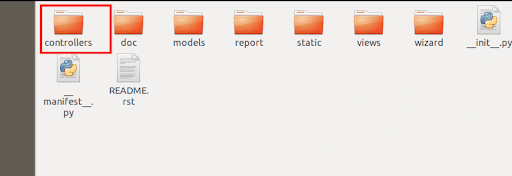
To work with controllers, firstly the user has to create a folder ‘controllers’ in their module. After that, add this folder inside the init file. Inside the controller's folder, one can give the init file and the python files like the models.
After adding controllers, the module structure will look like the below image:
Creating the Controller
To understand the workings of the controllers, here I’m creating a module that takes details of all sales orders from the backend and later displays them on the website (In Odoo V11).The details will be displayed in the URL ‘/my_sale_details’ (<odoo_instance>/my_sale_details).
Now I'm creating a controller to get the sales details, and passing these details to a webpage.
from odoo import http
from odoo.http import request
class Sale(http.Controller):
   @http.route('/my_sale_details', type='http', auth='public', website=True)
   def sale_details(self , **kwargs):
       sale_details = request.env['sale.order'].sudo().search([])
         return  request.render('my_sale_addons.sale_details_page', {'my_details': sale_details})
Let’s see the explanation of each part of the code.
Firstly we have to import some libraries to work with the controller, here, I have imported the ‘http’ and ‘request’ libraries.
‘@http.route’ is a decorator used for the routing purpose or it allows you to navigate to specific pages. Also, this helps to link the given URL to a specific webpage.
@http.route('/my_sale_details', type='http', auth='public', website=True)Under route, we have to use some keywords.
a) ‘/url’ - Need to specify the ‘url’ that to use. Here, I have given the ‘my_sale_details’, as needed.
b) ‘type’ - Specify the type of request.It can be ‘http’ or ‘json’ requests.
c) ‘auth’ - Defines who can access this URL or can view the webpage related to this link. It may,
1) ‘public’ - If auth=’public’, anyone can access the URL and view the webpage. There are no access restrictions.
2) ‘user’ - If auth=’user’, only logged-in users can access the URL and view the contents of the webpage.
3) ‘none’ - If auth=’none’, it is always active and mainly used by the authentication modules.
4) ‘website=True’ - Here we are mentioning that this controller is linked to a webpage.
Now we have to get the sales details in the backend.
sale_details = request.env['sale.order'].sudo().search([])
Currently, we have all sales order details in ‘sale_details’ variable. In models, we use ‘self.env’ to perform such operations, instead of that in controllers we have to use ‘request.env’.
Because of the access right issues of records, we have to give the keyword ‘sudo()’, before all operations (Eg: search, create,etc.).
Now we can render the webpage which displays the sales details.
return request.render('my_sale_addons.sale_details_page', {'my_details': sale_details}‘request.render’, helps to render a webpage from a controller. Inside the render method, we have to specify our module name and the template name of the web page. Here ‘my_sale_addons’ is my custom module name and ‘sale_details_page’ is the template name. Also passing the sale details to the webpage in the variable ‘my_details’.So we can access the ‘my_details’ variable from the website.
From this point, if you need to redirect to another URL instead of rendering a web we can use the ‘request.redirect’ method. For example, if needed to redirect to a ‘my_filtered_orders’,
return request.redirect('/my_filtered_orders') In the ‘sale_details’ function we have two parameters.
def sale_details(self , **kwargs):
In the ‘kwargs’ we can receive the arguments which are passed from a URL. For example, if I give my URL as ‘my_sale_details?id=1’ , then we can get the value of id in the function as kwargs[‘id’] or kwargs.get(‘id’).
Creating the View
Now we can create a detailed view that will display the sales order details. Inside the ‘views’ folder in our module, one can create the XML file. The template name of the XML file should be ‘sale_details_page’. Because, here, we called the view with this name from the controller.
<template id="sale_details_page" name="Sale Details"> <t t-call="website.layout"> <div class="oe_structure"> <div class="container"> <br /> <center> <h3>Sale Order Details</h3> </center> <br /> <table class="table-striped table"> <thead style="font-size: 23px;"> <tr> <h6> <b> <th>Sale Order</th> <th>Customer</th> <th>Date</th> <th><b>State</b></th> </b> </h6> </tr> </thead> <tbody> <t t-foreach="my_details" t-as="order"> <tr> <td><span t-esc="order.name" /></td> <td><span t-esc="order.partner_id.name" /></td> <td><span t-esc="order.date_order" /></td> <td><span t-esc="order.state" /></td> </tr> </t> </tbody> </table> </div> </div> </t></template>
Now the page ‘my_sale_details’ will display the sales details that we selected.
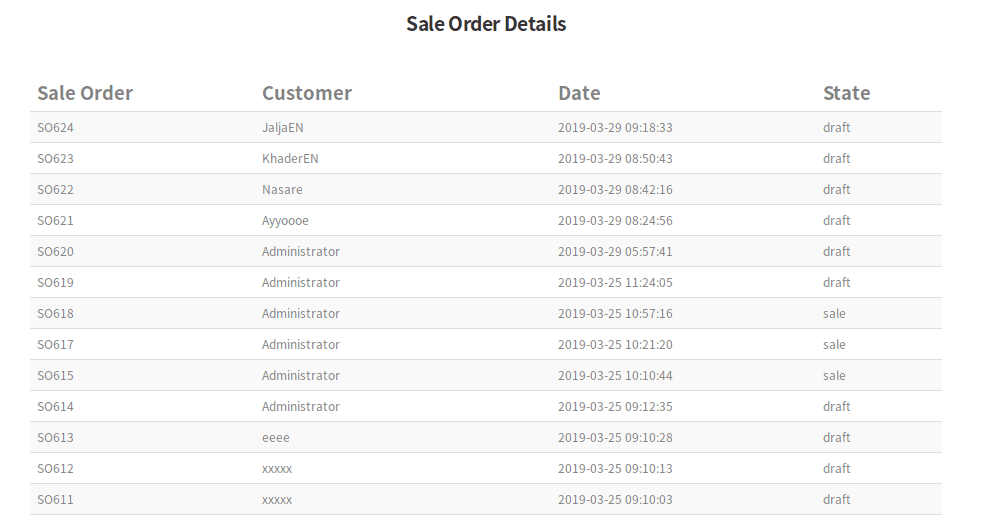
One can display the details as per their need and can give different styles to the table display.
Under Odoo, one can also override an existing function in the controller as per the need. It is different than overriding a function in models. For example, one can take the controller function in the ‘website_sale’ module. In this module, there is a function ‘payment_confirmation’ at the route ‘/shop/confirmation’.
To override this function, firstly one has to import the class on which the function is included.
from odoo.addons.website_sale.controllers.main import WebsiteSale
So now, we have imported the class via specifying the path of the file in which the function class exists. Here the ‘main’ is the file and ‘WebsiteSale’ is the class of the function.
One can override the controller function as,
from odoo.addons.website_sale.controllers.main import WebsiteSale
class WebsiteSaleInherit(WebsiteSale):
@http.route()
   def payment_confirmation(self, **post):
       res_super = super(WebsiteSaleInherit, self).payment_confirmation(**post)
                                                  #My Code                                       .
       return res_super
One can also rewrite a controller function as per their need. Odoo web controllers help in creating frontend modules. Mainly we have two types of request parameters in Odoo web controllers, HTTP, and JSON requests. Refer to our blog on How to Call JSON RPC to Web Controller in Odoo
Watch our Webinar On Web Controllers in Odoo: