In this blog, we’ll learn how to use the useRefListener hook in Odoo 18 to handle events on Owl templates. This hook helps to attach event listeners to an element using ref, especially if components need to handle multiple events.
Understanding Owl hooks helps you develop cleaner and more maintainable custom modules. In this blog, we will learn how to use useRefListener and how it can be integrated into a custom module.
Let's create a custom module with the structure given below.
{
    'Name': 'Your Module Name',
    'version': '18.0.1.0.0',
    'summary': 'Demonstration of useRefListener hooks in Odoo OWL 18',
    'depends': ['web'],
    'data': [
        'views/your_module_actions.xml',
    ],
    'assets': {
        'web.assets_backend': [
            'Your_module_name/static/src/js/component.xml',
            'Your_module_name/static/src/js/component.js',
        ],
    },
    'application': False,
}
In this example, we will create an Owl component along with a user interface. We can add a client action and a menu item to display the newly created component.
To create the custom component, we need to import the necessary owl hooks and other dependencies. Create a component.js file inside the static/src/js directory.
import { Component, useRef } from "@odoo/owl";
import { useRefListener } from "@web/core/utils/hooks";
import { registry } from "@web/core/registry";
export class MyCustomComponent extends Component {
    setup() {
        this.root = useRef("root");

        useRefListener(this.root, "mouseenter", (ev) => {
            let targetElement = ev.target;
            if (targetElement) {
                targetElement.style.backgroundColor = "red";
                targetElement.style.color = "white";
            }
        });
        useRefListener(this.root, "mouseleave", (ev) => {
            let targetElement = ev.target;
            if (targetElement) {
                targetElement.style.backgroundColor = "";
                targetElement.style.color = "";
            }
        });
    }
}
MyCustomComponent.template ="your_module_name.MyCustomTemplate";
registry.category("actions").add("my_client_action_tag", MyCustomComponent);
Create an XML file under the static/src/xml directory.
<?xml version="1.0" encoding="UTF-8"?>
<templates xml:space="preserve">
   <t t-name="your_module_name.MyCustomTemplate">
       <div class="o_my_client_action"
                style="display: flex; flex-direction: column; justify-content: center;
                align-items: center; height: 100vh; text-align: center;">
           <h1>useRefListener</h1>
           <p>This is a custom OWL component in Odoo 18.</p>
           <!-- Button -->
           <button type="button" class="btn btn-primary" t-ref="root">
               Hover me
           </button>
       </div>
   </t>
</templates>
Let's create the action and menu to view the custom component.
<?xml version="1.0" encoding="UTF-8"?>
<odoo>
   <!-- Client Action -->
   <record id="action_view_custom_component" model="ir.actions.client">
       <field name="name">View Custom Component</field>
       <field name="tag">my_client_action_tag</field>
   </record>
   <!-- Menu -->
   <menuitem id="menu_my_client_root"
             name="View Hook"
             sequence="10"/>
   <menuitem id="menu_my_client_action"
             name="Open Hook"
             parent="menu_my_client_root"
             action="action_view_custom_component"
             sequence="1"/>
</odoo>
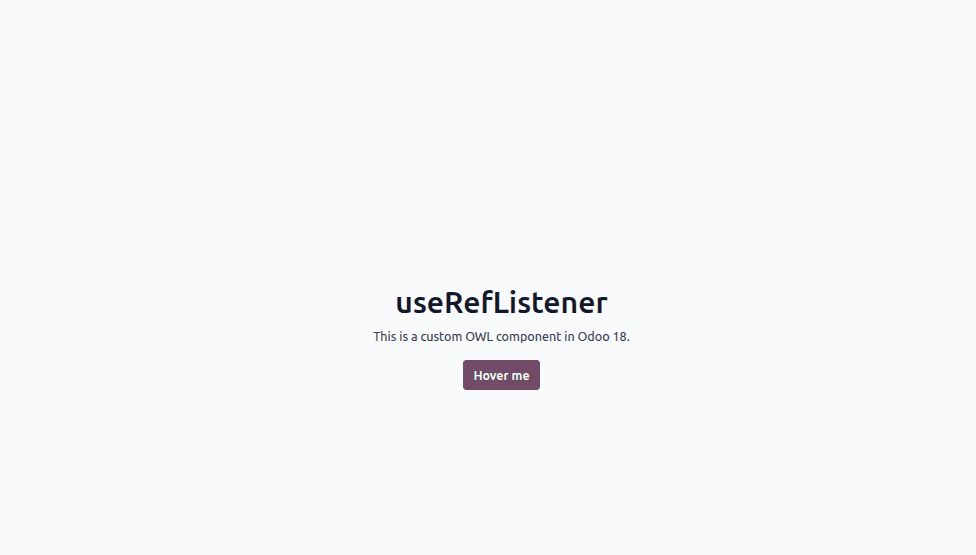
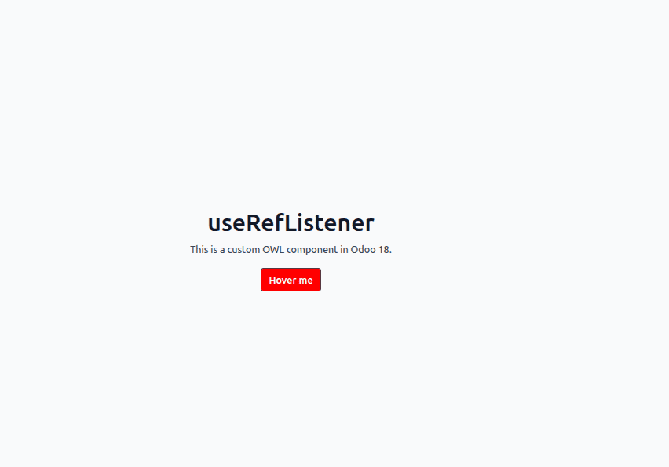
Move your mouse over the button and then move it away to see useRefListener in action. In our example, we configured the hook to change the button’s background color to red when the pointer enters the element. Once the pointer leaves, the button returns to its original background color.
Through this example, we explored how the useRefListener hook can be applied in Odoo 18 custom development to handle DOM events in a clean and structured way. It also manages the lifecycle of event listeners automatically by removing them when the component is unmounted. This helps avoid unnecessary listeners, reducing the risk of memory leaks and contributing to better frontend performance.
To read more about How to use the useRefListener hook in Odoo 19, refer to our blog How to use the useRefListener hook in Odoo 19.