Migrating a database from MySQL to PostgreSQL is a common task when moving to a more advanced database platform or starting a new project. A successful migration requires careful planning to ensure that database objects, data, indexes, and relationships are transferred correctly.
Postgresql Migrator is a command-line tool that simplifies this process by inspecting the source database, converting the schema, generating a migration script, and importing the data into PostgreSQL.
In this guide, we will learn how to migrate the classicmodels sample database from mysql to postgres using postgreql migrator, verify the migrated data, and confirm that the migration completed successfully.
Download the debian file of the pg_migrate tool.
After downloading the file, install it using the sudo apt install command like this.
sudo apt install ./pg-migrate_linux_amd64.deb
Reload your shell to enable the command line completion.
exec /bin/bash
Check installation by requesting the version:
pg_migrate --version
Result :
pg_migrate (PostgreSQL Migrator) v1.0.0
transqlate v0.8.0
cybrosys@cybrosys:~$ pg_migrate --help
PostgreSQL Migrator moves your database to PostgreSQL.
Usage:  pg_migrate [OPTIONS] COMMAND
Commands:
  convert                  Convert source catalog for PostgreSQL
  dump                     Dumps a source database as text files or to stdin
  init                     Initialize a new migration project
  inspect                  Fetch and analyse source database catalog
  status                   Describe a migration project
  ui                       Interactive audit web interface
General Options:
  -C, --directory string    Change to directory before doing anything
  -?, --help                Print help and exit
      --logfile string      Path to save log messages
      --offline             Prevent source database access
      --plain               Disable log coloration
      --profile             Write profiling data for debugging
      --skip-date-warning   Suppress the warning about outdated build
  -v, --verbose             Show debug log messages
  -V, --version             Print version and exit
Environment variables:
  PGMDIRECTORY		   Change to directory before doing anything.
  PGMOFFLINE		   Set to true prevent source database access.
Report bugs to https://gitlab.com/dalibo/pg_migrate/-/issues.
This is the current database in mysql.
List the databases.
mysql> show databases;
Result :
+--------------------+
| Database           |
+--------------------+
| classicmodels      |
| demo               |
| information_schema |
| mydb               |
| mysql              |
| performance_schema |
| sys                |
| test_db            |
| testdb             |
+--------------------+
9 rows in set (0.00 sec)
Connect to the database named classicmodelsa and list the table names, and check the results.
mysql> use classicmodels;
Result :
Database changed
Now check the tables.
mysql> show tables;
+-------------------------+
| Tables_in_classicmodels |
+-------------------------+
| customers               |
| employees               |
| offices                 |
| orderdetails            |
| orders                  |
| payments                |
| productlines            |
| products                |
+-------------------------+
8 rows in set (0.00 sec)
Check any of the data from the tables before migrating to postgresql.
mysql> select * from customers limit 5;
Result :
+----------------+----------------------------+-----------------+------------------+--------------+------------------------------+--------------+-----------+----------+------------+-----------+------------------------+-------------+
| customerNumber | customerName               | contactLastName | contactFirstName | phone        | addressLine1                 | addressLine2 | city      | state    | postalCode | country   | salesRepEmployeeNumber | creditLimit |
+----------------+----------------------------+-----------------+------------------+--------------+------------------------------+--------------+-----------+----------+------------+-----------+------------------------+-------------+
|            103 | Atelier graphique          | Schmitt         | Carine           | 40.32.2555   | 54, rue Royale               | NULL         | Nantes    | NULL     | 44000      | France    |                   1370 |    21000.00 |
|            112 | Signal Gift Stores         | King            | Jean             | 7025551838   | 8489 Strong St.              | NULL         | Las Vegas | NV       | 83030      | USA       |                   1166 |    71800.00 |
|            114 | Australian Collectors, Co. | Ferguson        | Peter            | 03 9520 4555 | 636 St Kilda Road            | Level 3      | Melbourne | Victoria | 3004       | Australia |                   1611 |   117300.00 |
|            119 | La Rochelle Gifts          | Labrune         | Janine           | 40.67.8555   | 67, rue des Cinquante Otages | NULL         | Nantes    | NULL     | 44000      | France    |                   1370 |   118200.00 |
|            121 | Baane Mini Imports         | Bergulfsen      | Jonas            | 07-98 9555   | Erling Skakkes gate 78       | NULL         | Stavern   | NULL     | 4110       | Norway    |                   1504 |    81700.00 |
+----------------+----------------------------+-----------------+------------------+--------------+------------------------------+--------------+-----------+----------+------------+-----------+------------------------+-------------+
5 rows in set (0.00 sec)
mysql>
Create a folder for the migration purpose and change the directory to that folder.
mkdir ~/classicmodels_migrationcd classicmodels_migration/
Check the running postgres clusters.
pg_lsclusters
Result:
Ver Cluster Port Status Owner    Data directory               Log file
14  main    5435 online postgres /var/lib/postgresql/14/main  /var/log/postgresql/postgresql-14-main.log
18  main2   5433 online postgres /var/lib/postgresql/18/main2 /var/log/postgresql/postgresql-18-main2.log
19  main    5436 online postgres /var/lib/postgresql/19/main  /var/log/postgresql/postgresql-19-main.log
Now create a database in MySQL
Log into MySQL.
sudo mysql
Create a database named classicmodels_pg.
create database classicmodels_pg;
Create a user and set a password like this.
mysql> CREATE USER 'migrator'@'localhost' IDENTIFIED BY 'mypassword';Query OK, 0 rows affected (0.01 sec)
Now grant all privileges of the database to the newly created user like this.
mysql> GRANT ALL PRIVILEGES ON classicmodels.* TO 'migrator'@'localhost';Query OK, 0 rows affected (0.00 sec)
Now flush the privileges.
mysql> FLUSH PRIVILEGES;
Query OK, 0 rows affected (0.01 sec)
Exit from the mysql like this.
mysql> EXIT;
Now go to the directory named classicmodels_migration and execute the command below to initialise the migration project by specifying the –source and –target like this.
cybrosys@cybrosys:~/classicmodels_migration$ pg_migrate init \
  --source "mysql://migrator:mypassword@localhost:3306/classicmodels" \
  --target "postgres://postgres@localhost:5436/classicmodels_pg"
Result :
16:52:29 INFO   Databases connections closed.    source=1 target=1
16:52:29 INFO   Initialized migration project.   source=(Ubuntu) version=8.0.46-0ubuntu0.22.04.4 path=/home/cybrosys/classicmodels_migration
16:52:29 INFO   Inspect source catalog using pg_migrate inspect.
Now check the contents inside this folder.
cybrosys@cybrosys:~/classicmodels_migration$ ls
Result :
pg_migrate.toml
Now read this file content using the cat command.
cybrosys@cybrosys:~/classicmodels_migration$ cat pg_migrate.toml
Result :
# PostgreSQL Migrator mysql Configuration
#
# See documentation for toml reference
# https://postgresql-migrator.readthedocs.io/en/latest/references/toml/
# Restrict the scope of the migration to schemas matching one of the pattern.
#Schemas = ["%"]
[Scores]
# Attach migration issue id to complexity score.
#"type: Column" = 0.1
[Convert]
# Enable identifier lowering.
#PreserveCase = false
# Enable automatic renaming of all constraints.
#RenameConstraints = false
# Enable automatic renaming of all indexes.
#RenameIndexes = false
[Dump]
# Ignore annotations and perform partial dump.
#Force = false
# Enable silent drop of zero bytes from text data.
#StripZeros = false
This is the configuration file we used during the migration process.
Now log in to MySQL and grant the select privilege on mysql.servers to the newly created role for the migration process.
mysql> GRANT SELECT ON mysql.servers TO 'migrator'@'localhost';
Query OK, 0 rows affected (0.00 sec)
mysql> FLUSH PRIVILEGES;
Query OK, 0 rows affected (0.00 sec)
Here we grant the migrator user permission to read the mysql.servers system table. This is because the Postgres migrator doesn't only read the application tables (such as customers, orders, and products). It also queries several MySQL system tables to collect metadata about the database.
The purpose of the pg_migrate inspect command is to analyze the source database and build an internal migration catalog. It does not migrate any data or create objects in the postgres.
Now execute the pg_migrate inspect command like this.
cybrosys@cybrosys:~/classicmodels_migration$ pg_migrate inspect
Result :
16:55:25 INFO   Inspecting source database.      driver=mysql
16:55:25 INFO   Inspected metadata.              software=(Ubuntu)
16:55:25 INFO   Found tables.                    count=8
16:55:25 INFO   Found columns.                   count=59
16:55:25 INFO   Found tables keys.               count=8
16:55:25 INFO   Found tables foreign keys.       count=8
16:55:25 INFO   Found indexes.                   count=6
16:55:25 INFO   Collected tables statistics.     count=8 missing=0
16:55:25 INFO   Collected partitions statistics. count=0
16:55:25 INFO   Collected subpartitions statistics. count=0
16:55:25 INFO   All statistics collected.        size=544KB
16:55:25 INFO   Auditing catalog.                driver=mysql catalog=MySQL
16:55:25 INFO   Catalog audited.
16:55:25 INFO   Converted catalog for PostgreSQL.
16:55:25 INFO   Auditing catalog.                driver=mysql catalog=PostgreSQL
16:55:25 WARN   Target catalog has pending annotations. count=57
16:55:25 INFO   Databases connections closed.    source=2 target=0
16:55:25 INFO   Inspection terminated.           errs=0 source=(Ubuntu) version=8.0.46-0ubuntu0.22.04.4 online=true
16:55:25 INFO   Execute pg_migrate ui to browse project.
16:55:25 INFO   Execute pg_migrate dump to migrate for PostgreSQL.
Now check the contents inside this folder.
cybrosys@cybrosys:~/classicmodels_migration$ ls
Result :
inspect.log pg_migrate.toml
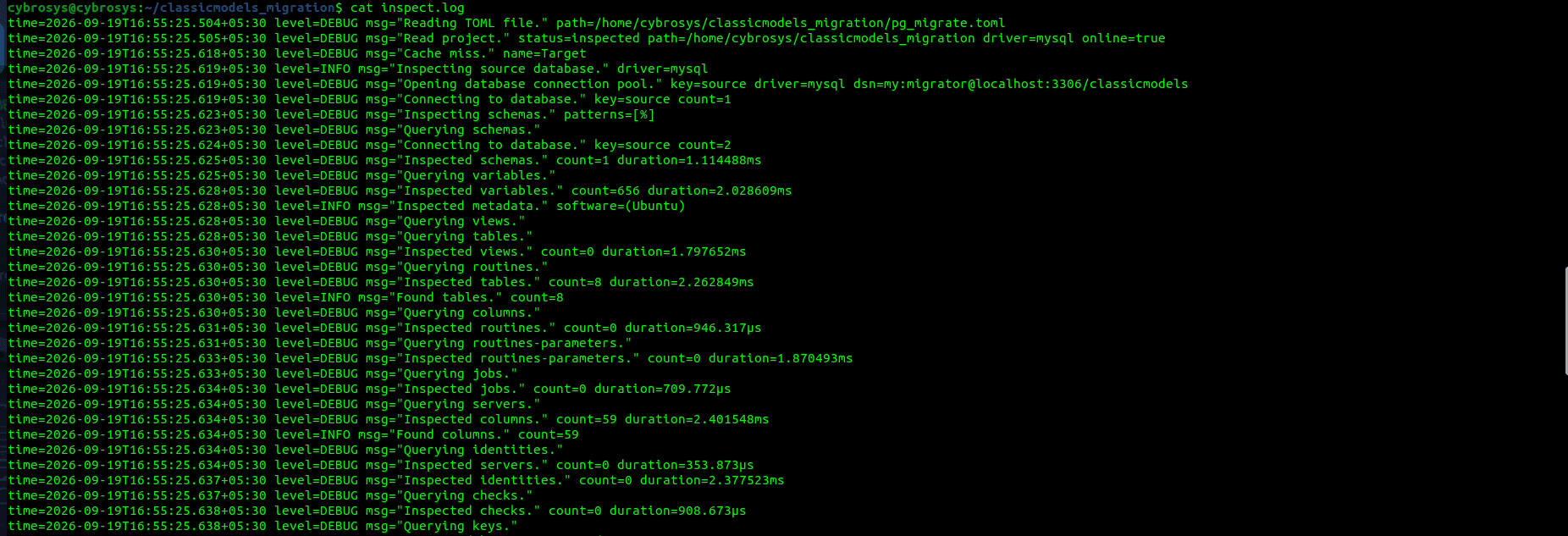
Now read the contents of the file named inspect.log using the cat command.
cat inspect.log
Result :
Now use the pg_migrate convert command like this.
The purpose of pg_migrate convert is to convert the inspected mysql database catalog into a Postgresql compatible catalog. It translates the source database metadata so that the postgres can easily understand it.
cybrosys@cybrosys:~/classicmodels_migration$ pg_migrate convert
Result :
16:56:53 INFO   Converted catalog for PostgreSQL.
16:56:53 INFO   Auditing catalog.                driver=mysql catalog=PostgreSQL
16:56:53 WARN   Target catalog has pending annotations. count=57
16:56:53 INFO   Run pg_migrate dump to migrate.
Now check the contents inside this folder again.
cybrosys@cybrosys:~/classicmodels_migration$ ls
Result :
convert.log inspect.log pg_migrate.toml
Check the flags available with the pg_migrate convert tool like this.
cybrosys@cybrosys:~/classicmodels_migration$ pg_migrate convert --help
Result :
Usage: pg_migrate [OPTIONS] convert [OPTIONS]
Converts source catalog for PostgreSQL.
Transpiles code. Renames identifiers. Converts column types.
Uses dump to generate DDL.
Options:
  -?, --help      Show help
      --refresh   Refresh target catalog
See pg_migrate --help for more informations.
The purpose of the pg_migrate dump command is to generate the postgresql migration script and export the mysql data into that script. This is the step where the actual migration SQL is created.
Now use the pg_migrate dump command like this.
cybrosys@cybrosys:~/classicmodels_migration$ pg_migrate dump \
    --force \
    --file migration.sql
Result :
16:59:20 INFO   Auditing catalog.                driver=mysql catalog=PostgreSQL
16:59:20 WARN   Ignoring unhandled annotations in target model. len=57
16:59:20 INFO   Collected tables statistics.     count=8 missing=0
16:59:20 INFO   Collected partitions statistics. count=0
16:59:20 INFO   Collected subpartitions statistics. count=0
16:59:20 INFO   All statistics collected.        size=544KB
16:59:20 INFO   Dumping to file.                 path=migration.sql format=plain
16:59:20 INFO   Create schema.                   path=Schemas/classicmodels
16:59:20 INFO   Create table.                    path=Tables/classicmodels.productlines
16:59:20 INFO   Create table.                    path=Tables/classicmodels.orderdetails
16:59:20 INFO   Create table.                    path=Tables/classicmodels.offices
16:59:20 INFO   Create table.                    path=Tables/classicmodels.orders
16:59:20 INFO   Create table.                    path=Tables/classicmodels.payments
16:59:20 INFO   Create table.                    path=Tables/classicmodels.products
16:59:20 INFO   Table copied.                    table=classicmodels.productlines elapsed=0s data=3.3KB batches=1 rows=7 rate="8  rows/s" sn=10007
16:59:20 INFO   Table copied.                    table=classicmodels.orderdetails elapsed=30ms data=78.2KB batches=1 rows=2996 rate="99.9K rows/s" sn=10004
16:59:20 INFO   Table copied.                    table=classicmodels.offices elapsed=30ms data=515B batches=1 rows=7 rate="233 rows/s" sn=10003
16:59:20 INFO   Table copied.                    table=classicmodels.orders elapsed=40ms data=32.8KB batches=1 rows=326 rate="8.2K rows/s" sn=10005
16:59:20 INFO   Table copied.                    table=classicmodels.payments elapsed=40ms data=11.4KB batches=1 rows=273 rate="6.8K rows/s" sn=10006
16:59:20 INFO   Create table key.                path=Tables/classicmodels.offices/Keys/offices_pkey
16:59:20 INFO   Create table key.                path=Tables/classicmodels.productlines/Keys/productlines_pkey
16:59:20 INFO   Create table key.                path=Tables/classicmodels.orderdetails/Keys/orderdetails_pkey
16:59:20 INFO   Create table key.                path=Tables/classicmodels.orders/Keys/orders_pkey
16:59:20 INFO   Table copied.                    table=classicmodels.products elapsed=10ms data=28.4KB batches=1 rows=110 rate="11K rows/s" sn=10008
16:59:20 INFO   Create table key.                path=Tables/classicmodels.payments/Keys/payments_pkey
16:59:20 INFO   Create table index.              path=Tables/classicmodels.orderdetails/Indexes/orderdetails_productCode_idx
16:59:20 INFO   Create table.                    path=Tables/classicmodels.customers
16:59:20 INFO   Create table index.              path=Tables/classicmodels.orders/Indexes/orders_customerNumber_idx
16:59:20 INFO   Create table.                    path=Tables/classicmodels.employees
16:59:20 INFO   Create table key.                path=Tables/classicmodels.products/Keys/products_pkey
16:59:20 INFO   Create table index.              path=Tables/classicmodels.products/Indexes/products_productLine_idx
16:59:20 INFO   Create foreign key.              path=Tables/classicmodels.orderdetails/ForeignKeys/orderdetails_orderNumber_fkey
16:59:20 INFO   Create foreign key.              path=Tables/classicmodels.products/ForeignKeys/products_productLine_fkey
16:59:20 INFO   Create foreign key.              path=Tables/classicmodels.orderdetails/ForeignKeys/orderdetails_productCode_fkey
16:59:20 INFO   Table copied.                    table=classicmodels.employees elapsed=0s data=1.6KB batches=1 rows=23 rate="8  rows/s" sn=10002
16:59:20 INFO   Table copied.                    table=classicmodels.customers elapsed=10ms data=13.7KB batches=1 rows=122 rate="12.2K rows/s" sn=10001
16:59:20 INFO   Create table key.                path=Tables/classicmodels.employees/Keys/employees_pkey
16:59:20 INFO   Create table index.              path=Tables/classicmodels.employees/Indexes/employees_officeCode_idx
16:59:20 INFO   Create table index.              path=Tables/classicmodels.employees/Indexes/employees_reportsTo_idx
16:59:20 INFO   Create table key.                path=Tables/classicmodels.customers/Keys/customers_pkey
16:59:20 INFO   Create foreign key.              path=Tables/classicmodels.employees/ForeignKeys/employees_reportsTo_fkey
16:59:20 INFO   Create table index.              path=Tables/classicmodels.customers/Indexes/customers_salesRepEmployeeNumber_idx
16:59:20 INFO   Create foreign key.              path=Tables/classicmodels.employees/ForeignKeys/employees_officeCode_fkey
16:59:20 INFO   Create foreign key.              path=Tables/classicmodels.customers/ForeignKeys/customers_salesRepEmployeeNumber_fkey
16:59:20 INFO   Create foreign key.              path=Tables/classicmodels.payments/ForeignKeys/payments_customerNumber_fkey
16:59:20 INFO   Create foreign key.              path=Tables/classicmodels.orders/ForeignKeys/orders_customerNumber_fkey
16:59:20 INFO   Dump completed.                  elapsed=50ms tasks=57 jobs=4 mem=61.5MB tables=8 copied=169.9KB throughput=3.3MB/s sections=pre,data,post annotations=57
16:59:20 INFO   Databases connections closed.    source=4 target=0
Now check the contents again.
cybrosys@cybrosys:~/classicmodels_migration$ ls
Result :
convert.log dump.log inspect.log migration.sql pg_migrate.toml
Now we can see the migration.sql file created by the pg_migrate dump command.
So now restore this file into our created database named classicmodels_pg like this.
cybrosys@cybrosys:~/classicmodels_migration$ psql -h localhost -p 5436 -U postgres -d classicmodels_pg -f migration.sql
Result :
CREATE SCHEMA
CREATE TABLE
ALTER TABLE
CREATE TABLE
ALTER TABLE
CREATE TABLE
ALTER TABLE
CREATE TABLE
ALTER TABLE
CREATE TABLE
ALTER TABLE
CREATE TABLE
ALTER TABLE
COPY 7
COPY 2996
COPY 7
COPY 326
COPY 273
ALTER TABLE
ALTER TABLE
COPY 110
ALTER TABLE
ALTER TABLE
ALTER TABLE
CREATE INDEX
CREATE TABLE
ALTER TABLE
CREATE INDEX
CREATE TABLE
ALTER TABLE
ALTER TABLE
CREATE INDEX
ALTER TABLE
ALTER TABLE
ALTER TABLE
COPY 23
COPY 122
ALTER TABLE
CREATE INDEX
CREATE INDEX
ALTER TABLE
ALTER TABLE
CREATE INDEX
ALTER TABLE
ALTER TABLE
ALTER TABLE
ALTER TABLE
Now log into the psql on port 5436 and check the contents, and verify whether the migration process happens correctly or not.
cybrosys@cybrosys:~/classicmodels_migration$ sudo su postgres
postgres@cybrosys:/home/cybrosys/classicmodels_migration$ psql -p 5436
psql (19beta2)
Type "help" for help.
postgres=# \c classicmodels_pg
You are now connected to database "classicmodels_pg" as user "postgres".
classicmodels_pg=# select * from classicmodels.
classicmodels.customers     classicmodels.offices       classicmodels.orders        classicmodels.productlines
classicmodels_pg=# select * from classicmodels.customers limit 5;
 customerNumber |        customerName        | contactLastName | contactFirstName |    phone     |         addressLine1         | addressLine2 |   city    |  state   | postalCode |  country  | salesRepEmp
loyeeNumber | creditLimit
----------------+----------------------------+-----------------+------------------+--------------+------------------------------+--------------+-----------+----------+------------+-----------+------------
------------+-------------
            103 | Atelier graphique          | Schmitt         | Carine           | 40.32.2555   | 54, rue Royale               |              | Nantes    |          | 44000      | France    |
       1370 |    21000.00
            112 | Signal Gift Stores         | King            | Jean             | 7025551838   | 8489 Strong St.              |              | Las Vegas | NV       | 83030      | USA       |
       1166 |    71800.00
            114 | Australian Collectors, Co. | Ferguson        | Peter            | 03 9520 4555 | 636 St Kilda Road            | Level 3      | Melbourne | Victoria | 3004       | Australia |
       1611 |   117300.00
            119 | La Rochelle Gifts          | Labrune         | Janine           | 40.67.8555   | 67, rue des Cinquante Otages |              | Nantes    |          | 44000      | France    |
       1370 |   118200.00
            121 | Baane Mini Imports         | Bergulfsen      | Jonas            | 07-98 9555   | Erling Skakkes gate 78       |              | Stavern   |          | 4110       | Norway    |
       1504 |    81700.00
(5 rows)
Now the data is the same.
Postgresql migrator provides a straightforward way to move databases from mysql database to Postgres. By following the steps in this guide, we can successfully inspect the source database, convert the schema, generate the migration script, import the data into Postgresql, and verify the migrated records.
Performing these validation steps after the migration helps ensure that the database structure and data have been transferred correctly, making the PostgreSQL database ready for further development and use.