pg_hardstorage does something different than the normal tools. pg_hardstorage does physical backups, which are done in a way that we do not need to set up the archive_command in the configurations, and no SSH access is required to the database. You do not need to make any new installations or extensions in the actual production server.
The connection will be a libpq connection, a replication-like connection, not a normal one. Which means to set up pg_hardstorage, you will need a role with replication or superuser, and make changes in pg_hba.conf, wal_level and also max_wal_senders and max_replication_slots. And you will need to add a replication user in pg_hba.conf of the server.
What is pg_hardstorage?
Most tools we use for backups may ask for too many things to be set up on the production server to get things done correctly. You may need to install extensions or create SSH keys to configure the backup setup. But when it comes to pg_hardstorage, we just need to make a few almost silent settings in the host. Pg_hardstorage takes a physical base backup and streams the WALs continuously. In case of restore, it uses both the base backup and the continuous logs we have.
Pg_hardstorage opens a normal libpq connection, and it directly issues the replication-protocol commands needed to request a base backup and stream WAL; This is almost what happens when you do streaming replication.
How to set up pg_hardstorage in your system?
Let’s consider two server IPs 10.0.20.10, this is where your production database exists with port 5432, and 10.0.20.20, where you need the backup to be done (this one only needs disk space and the pg_hardstorage, may not have PostgreSQL installed).
Now on production server (10.0.20.10), you will need to make simple configurations only:
1. Create a postgres role. In this case, we use odoo_backup:
CREATE ROLE odoo_backup WITH REPLICATION LOGIN PASSWORD 'give_your_password';
2. Next, you need to add a line in pg_hba.conf as given below (find the directory by SHOW hba_file; command in psql) :
host  replication  odoo_backup  10.0.20.20/32  scram-sha-256
host  postgres     odoo_backup  10.0.20.20/32  scram-sha-256
3. Then, you will reload the postgresql
SELECT pg_reload_conf();
4. Finally, you need to make sure that these 3 parameters are set as mentioned; these might already be set by default if they have not been changed for any custom needs:
SHOW wal_level;             -- replica or logical
SHOW max_wal_senders;       -- at least 3
SHOW max_replication_slots; -- at least 3
This is what you have to set up the database side; no new installations are done here.
Now, on the backup server with IP 10.0.20.20, do the following:
1. Install the pg_hardstorage binary:
curl -sSL https://get.pghardstorage.org | sh
To confirm if pg_hardstorage is installed, run pg_hardstorage version.
2. Create the backup repository:
On the backup server:
sudo mkdir -p /srv/pg-backups/prod
Give your backup user ownership:
sudo chown -R cybrosys:cybrosys /srv/pg-backups
Set permissions:
sudo chmod 750 /srv/pg-backups
sudo chmod 750 /srv/pg-backups/prod
Then, initialize the repository:
pg_hardstorage repo init file:///srv/pg-backups/prod
3. Configure connection variables
export PG_CONNECTION='postgres://odoo_backup:your_password@10.0.20.10:5432/postgres'
export REPO='file:///srv/pg-backups/prod'
Check:
echo "$PG_CONNECTION"
echo "$REPO"
You should have something like:
postgres://odoo_backup:...@10.0.20.10:5432/postgres
file:///srv/pg-backups/prod
4. Now run:
pg_hardstorage deployment add prod \
  --connection "$PG_CONNECTION" \
  --repo "$REPO"
Here, prod is the deployment name.
Then run:
pg_hardstorage doctor prod
Running doctor is safer, this is to do a configuration check on wal_level, max_replication_slots, max_wal_senders, and the replication role’s attribute. This will show you any issue sin the line you added in pg_hba.conf
5. Start the WAL streamer. Run this manually first to check if it works:
pg_hardstorage wal stream prod
Leave it running.
6. In another shell, take the first base backup
pg_hardstorage backup prod
pg_hardstorage list prod
7. This is optional, but highly recommended to check if the backup we have is restorable. You will need a postgresql installed to test this in backup host:
pg_hardstorage restore prod latest --repo "$REPO" \
  --target /var/lib/postgresql/restored \
  --to '2026-08-01 02:14:00+00'
pg_verifybackup /var/lib/postgresql/restored
pg_ctl -D /var/lib/postgresql/restored -o "-p 5433" start
psql -p 5433 -c 'SELECT count(*) FROM res_partner;'
You may use your port number instead of 5433, and instead of SELECT count(*) FROM res_partner; you may use any tables in your database, to see if it contains all you expected.
How does pg_hardstorage work?
Now let’s see what happens under the hood in the case of pg_hardstorage.
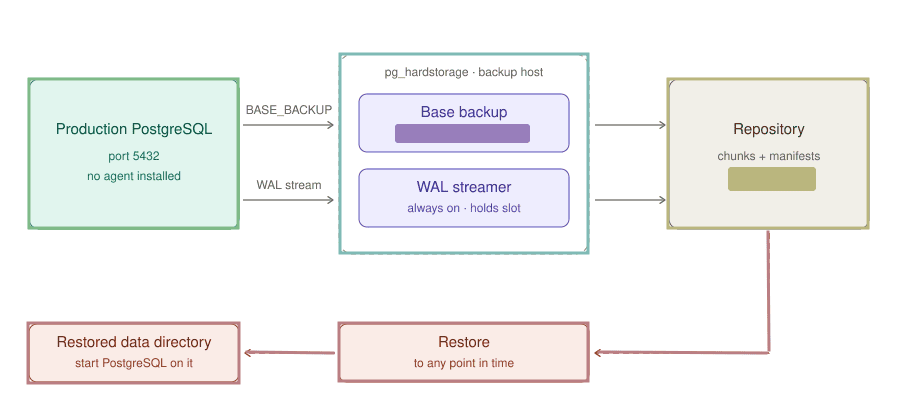
During the connection, the backup host connects to port 5432 like a normal client, but ask a replication connection. For the production host, this looks like a standby being created.
Then, the backup host uses BASE_BACKUP. Before a single file is sent, PostgreSQL will perform a checkpoint. That checkpoint’s redo location becomes the backup’s LSN, and it is recorded in backup_label. And, then starts to continuously stream data from the directory to the connection. The copy might not be consistent because of the changes made during the read. The WAL covering that window is captured too, and replaying it at restore time brings the stale parts forward.
Then a second, permanent process holds the physical replication slot, which is created with RESERVE_WAL, so PostgreSQL retains WAL from the moment the slot exists, not from the first byte streamed. Each default 16 MiB segment completed is transferred and acknowledged. The two processes share nothing but a repository URL, so a streamer crash is just a restart, with no gap.
There is no chain happening here. The data is divided into chunks, hashed and encrypted, then written. Same chunks are written only once. A manifest lists the ordered chunks and the WAL range covered. No proprietary container, no chain. Then, these chunks are materialized into a directory along a recovery configuration, so the restored instance replays WAL streams up to the target (which could be a timestamp, or a restore point, or latest.
Important note: The slot that makes this gap-free is also the thing to watch. As long as it exists, postgres will not recycle WAL past its restart_lsn, so if the streamer stays down and nobody notices, pg_wal on production keeps growing until the disk fills. Set max_slot_wal_keep_size (a reload, no restart), alert on the slot going inactive, and the doctor will flag the configuration for you.
So, this is how you set up pg_hardtorage; it does not do something PostgreSQL cannot already do. It is that it asks PostgreSQL for exactly what postgres already knows how to give: a base backup and a WAL stream, over the same replication protocol a standby uses. The whole production-side setup is a role, one line in pg_hba.conf, and a reload. Nothing installed, nothing compiled, no SSH key, no archive_command. If you have ever tried to set up a backup tool on a client's production server that you do not fully control, you know how much that is worth.